Calendar file guides
How to import an ICS file into Google Calendar
On a computer, open Google Calendar's import page. Choose your .ics file, select the calendar that should receive its events, and click Import. This copies the events into that calendar.
Open Google Calendar importOpens in a new tab. If you use several Google accounts, check that the right account is selected before importing.
By Just Schedule Me · Instructions checked against Google's help on
Before you start
Save the file to your computer. If your calendar export came in a ZIP, extract it first and use the .ics file inside. Google's import limit is 1 MB per file.
Unsure what it contains? Preview the events in the ICS viewer first. For a practice run, you can create a separate calendar so the sample stays apart from your schedule.
Import your ICS file in four steps
Open the import page on a computer
Go straight to Google Calendar's Import & export page and sign in to the account where you want the events.
To find it from Google Calendar yourself, click the gear icon at the top right, choose Settings, then select Import & export from the left side.
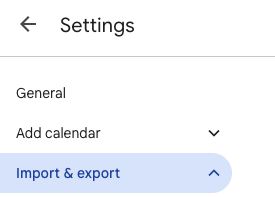
Choose Import & export in Settings. Choose your file
Click Select file from your computer and choose the file ending in .ics. An iCal export uses this same format.
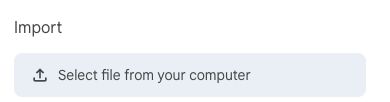
Select the .ics file saved on your computer. Choose the destination and import
Under Add to calendar, pick the calendar that should receive the events. Check this selection: Google defaults to your primary calendar. Click Import once.
Check an imported event
Return to your calendar and look at a date from the file. Make sure the destination calendar is visible, then check the event's date and time before importing another file.
These steps follow Google's import instructions. Guests and conference details are not imported.
Practice file
Try it with one sample event
This small file adds one all-day event called “Practice import — JustScheduleMe” on 15 January 2030. Use it to try the steps above, then delete the practice event when you're finished.
Download sample .icsIt contains no guests or built-in alerts. Your calendar's default notification settings may still apply.
Import a file or subscribe to a link?
Import a downloaded .ics file when you want a one-time copy. Later changes to the original calendar will not update that copy.
For a published calendar feed that should stay connected to its source, use Other calendars → + → From URL on a computer. Paste the published calendar's URL and choose Add calendar. A local file on your computer cannot serve as that URL.
See Google's instructions for adding a public calendar by URL.
Google Calendar not importing your ICS file?
Start with the message Google shows. These checks follow Google's import troubleshooting guide.
- “Processed zero events”
- This can appear if you import the same file again after a successful import. Check the destination calendar and event dates before retrying.
- The file is too large
- Files must be 1 MB or smaller. Try exporting a shorter date range from the original calendar and importing that smaller file.
- The file cannot be processed, or only some events appear
- Check that you selected an extracted .ics file. Check its formatting with the ICS validator. Fix any reported errors or request a fresh export from the source; a validator pass does not guarantee Google will accept every event.
- Events appear at the wrong time
- Compare the time zone in the original calendar with your Google Calendar time zone. Inspect an affected event in the ICS viewer before changing or reimporting it.
- Repeating events became separate events
- The source may have exported individual occurrences. CSV exports can lose recurrence. If available, export again as ICS from the original calendar.
Can you import ICS on iPhone or Android?
Google's documented file-import process requires a computer. There is no Import & export screen in the Google Calendar mobile app. Import on the web, then open the same Google account in your phone's calendar app and make sure the destination calendar is selected.
See Google's mobile import guidance. If you want to open the file in Apple Calendar instead, follow our ICS to iPhone Calendar guide.
Starting with a spreadsheet, photo, or email?
For a spreadsheet of events, the CSV to ICS converter lets you map columns and check the dates before downloading a file to import.
For a flyer or screenshot, try photo to calendar. For event details in an email, use text to calendar. Just Schedule Me can turn those details into calendar events for you to review.